












![]() |
Terragen 2 Beta, Free Non-Commercial Edition (Build 1.10.23.1)This is a recommended update for users of the Free Non-Commercial Edition of Terragen 2 Technology Preview.
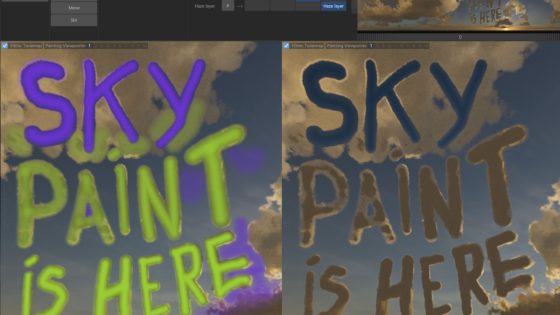
DownloadsChanges from 1.9.99.1 (Tech Preview 5) to 1.10.23.1 (Beta)Undo and Undo History. There is no particular limit on the number of actions that can be undone, except for available memory. Painted Shader. Allows you to paint masks or surface colours in the previews, including the 3D Preview. It is a colour shader which you can use just like any other surface shader for distributing populations, blend shaders, etc. To start painting, click the menu button labeled 'B' (the Paint menu button) at the top of a preview and select "Start painting shader". From that submenu you can create and paint a new shader or continue painting with an exiting Painted Shader. More options are available from the Paint menu button while in painting mode and on the Painted Shader's parameter window. Mouse and keyboard shortcuts can be found in Preferences or Help -> Mouse and Key Settings. Improved cloud rendering speed in multi-threaded renders by improving the memory handling for the cloud acceleration cache. Also slightly improved speed of the acceleration cache regardless of thread settings. "Microvertex jittering" option in the renderer, which reduces the appearance of parallel lines in the subdivison pattern of surfaces. This was often a problem on water, for example. "Detail jittering" option in the renderer. 6 pixel filters to choose from, including Box, Tent, Narrow Cubic, Cubic B-Spline, Mitchell-Netravali, Catmull-Rom. "Box" gives the same results as previous versions. Anti-aliasing bloom option to reduce aliasing of pixels that are too bright to be handled by normal anti-aliasing techniques. It uses a combination of pixel and subpixel convolutions. Very bright points and edges appear to expand and are slightly softened with this option enabled. Enabled by default for new renderers except the default project's Quick Render. Default value for detail blending is now 0, for faster renders. For animations you may wish to increase detail blending. Fixed a ray tracing bug that could cause incorrect reflections close to recently traces shadows or vice versa. Fixed a problem with the finish and display of renders: Fixed a problem where the more renders you did in a session, the longer it would take between the render finishing and the final image being displayed in the render window. This might appear as the render window going blank for some time after a render finished. It also stops memory usage climbing when a render finishes, as well as potentially preventing a crash on render completion. Surface layers now have an "Enable test colour" option in the Colour tab. Checking the checkbox will cause the test colour to override the layer's colour or colour function. This should help with tweaking surface layers. Rock object improvements:
Fixed a bug in the Grass Clump that allowed its transform to be reset whenever the object was regenerated (e.g. after changing a parameter). Fixed a bug in Compute Terrain and Compute Normal that would cause incorrect displacement and normals when multiple Compute Terrain or Compute Normals nodes were used. Image Map Shader fixes:
Cloud Layer V2 improvements:
Changed the default glow settings in Planet Atmosphere and Cloud Layer V2. Filename sequences in the Image Map Shader now work in the GUI (e.g. using %04d to represent the frame number). These images are reloaded whenever the frame number is changed in the timeline and while rendering an image sequence. Other user interface fixes and improvements: Preferences option to turn off special tooltips (3D Preview, Network View, Navigation Window), because these tooltips could cause crashes on some Windows systems. Camera and Renderer lists now have node creation buttons (i.e. "Add Camera" button ). The "Add Layer" and "Add Child Layer" menus on the Shaders list have been simplified by removing the unnecessary "Surface Shader" submenu. Improved the selection behaviour of the node lists when new items are added. Errors and Warnings window now reformats messages so they display on just one line. This was mainly an issue on Windows, and could cause problems such as only seeing part of a message. Fixed a small memory leak in the 3D Preview navigation panel, which could also lead to GDI handles leaking on Windows. Mac only: Tweaked the layout of controls underneath the certain node lists. Customise Input Bindings window now supports restrictions on the type of binding (key/mouse/mouse wheel) you can apply to an action. Fixed some problems with the custom input bindings system. Windows only: Fixed a longstanding bug where opening param floaters from a choose node button (i.e. Surface shader button in OBJ reader node) would lead to the param floater not having correct floating behaviour. This could lead to it disappearing behind the main window when opened, for instance. Mac only: Fixed a problem where opening a secondary view (new network view/3D preview) from a context menu in the network view or 3D preview would open the new window but then immediately move it behind the window being clicked in. This could give the impression the new window wasn't opened at all. Also stops a param floater being disabled when opened from a context click on a node. Fixed a problem where the timeline slider wouldn't update fully if you set the current frame to a value outside its range. Mac only: Key repeat now works, for example if you click in the 3D Preview and press the Increase Exposure key the exposure will increase until you release the key. Previously you would have had to press the key multiple times. Fixed a bug where using custom input presets stopped shift-click multiple selection working in the network view. Fixed a problem with the 3D Preview Location window, which appeared to be blank. Windows only: Fixed a crashing bug in the terrain and shaders node lists, which happened if you used the move up/down buttons after creating a new item in the list and before selecting an item in the list Windows only: Fixed a bug which stopped navigation in the movement ring working correctly for nav panels in 3D Previews. |
|
terragen start page
-
planetside front page
-
privacy policy
-
email terragen@planetside.co.uk
Terragen is a trademark of Planetside Software. All other trademarks are the property of their respective owners Planetside Software is based in the United Kingdom |